L4D2 2023 dedicated server tutorial
Overview
It's been a while since I last played and recently I was trying play versus but always high ping. Looks like there aren't many Brazilian servers anymore (vanilla versus). Next, I've decided to try to host my own. It took me some weeks to figure out everything, plus my limitations around linux management. Therefore, here's my own tutorial about hosting a L4D2 versus linux. It may sound funny but the linux setup it's not that hard.
In short, this will help you how to setup a vanilla versus server (with extra mods to keep the server running in VERSUS).
Server Piol @gangsta L4D2 Versus BRAZIL
Configuration
- Ubuntu 20 LTS Azure VM
- Intel Xeon Platinum 8272CL (1)
- 3.3GB RAM
- 30GB SSD
Setup
We'll cover each separately: VM and Software setup (SteamCMD, LinuxGSM and mods and server).
VM setup
Create a ubuntu linux VM in Azure
This should be straightforward. By default, only ssh connections will be available. If needed, you can install the remote desktop on it and be able to have visual interface. https://learn.microsoft.com/en-us/azure/virtual-machines/linux/quick-create-portal?tabs=ubuntu
Make sure TPC and UDP ports are open for the server. If you didn't change, the default port for source games is 27015
Optional: graphical interface for remote desktop
If you want, just follow these instructions: https://learn.microsoft.com/en-us/azure/virtual-machines/linux/use-remote-desktop?tabs=azure-cli
Software setup
SteamCMD
Steam CMD is the console version used by dedicated servers. No graphical interface. Install using following instructions https://developer.valvesoftware.com/wiki/SteamCMD
LinuxGSM
LinuxGSM is a command-line tool for quick, simple deployment of linux dedicated game servers. https://linuxgsm.com/servers/l4d2server/
Metamod and Sourcemod
We'll need to install Metamod first followed by Sourcemod. These are the binaries that will enable us adding some plugins to the server.
Metamod is a C++ plugin environment for Source engine games. Find the install guide here https://www.sourcemm.net/
Sourcemod is a server modification that depends on Metamod https://www.sourcemod.net/
Mods
Here are the list of plugins that I've added to my server:
-
[L4D2] Versus Rematch Vote Block
- Blocks the Versus rematch voting panel when the entire game has finished
- No extra configuration needed
-
[L4D2] Bot Delay
- Prevents bots from rushing out of the saferoom before people have a chance to load into the game
- The configuration I use is already in l4d2server.cfg
-
[L4D/L4D2] All Bot Teams
- Keeps server running even when there are only players on one team
- Configuration is also in l4d2server.cfg
-
[L4D2] Automatic Campaign Switcher
- Solves the problem of players returning to the lobby because the vote to restart a campaign was not passed
- The configuration for map list I use is as following for versus only acs_map _list.txt. Place it in /home/user/serverfiles/left4dead2/addons/sourcemod/configs/
Server configuration
Now, the last but not least important steps:
-
Configuration file
Place this file in your l4d2server.cfg folder
-
Banner
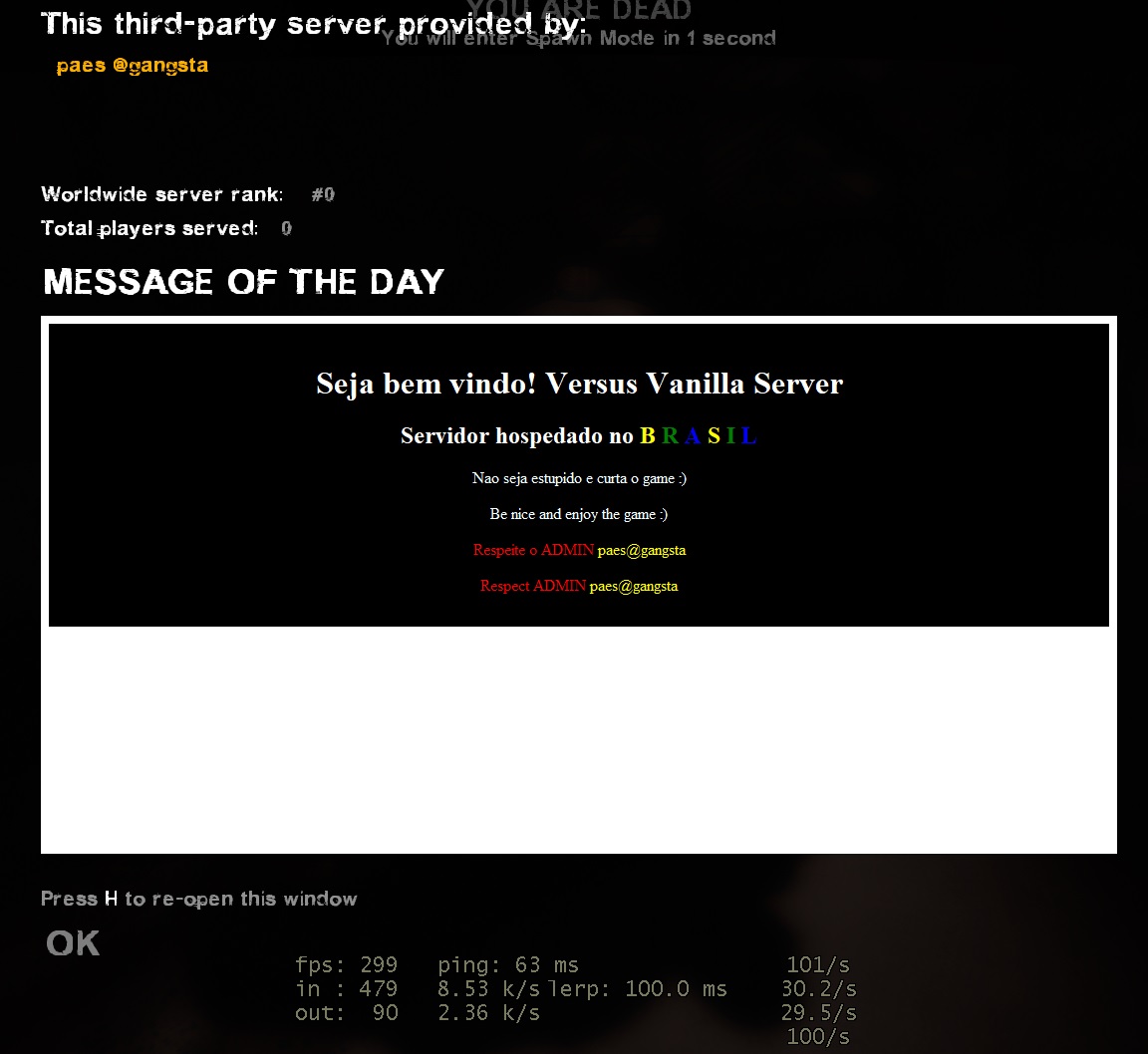
Look for /home/user/serverfiles/left4dead2/host.txt - I wasn't able to add an html so I've leaved with my name.
-
Message of the day
Look for /home/user/serverfiles/left4dead2/motd.txt. You can extend or use your own ideas. Same as banner, use plain text or html.
<html>
<body>
<div style="background-color:black;padding-bottom:15px;">
<br />
<h1 style="color:white;text-align:center;">Seja bem vindo! Versus Vanilla Server</h1>
<h2 style="color:white;text-align:center;">Servidor hospedado no
<span style="color: yellow;">B</span>
<span style="color: green;">R</span>
<span style="color: blue;">A</span>
<span style="color: yellow;">S</span>
<span style="color: green;">I</span>
<span style="color: blue;">L</span>
</h2>
<p style="color:azure;text-align:center;">Nao seja estupido e curta o game :)</p>
<p style="color:azure;text-align:center;">Be nice and enjoy the game :)</p>
<p style="color:red;text-align:center;">Respeite o ADMIN <span style="color:
yellow;">paes@gangsta</span></p>
<p style="color:red;text-align:center;">Respect ADMIN <span style="color:
yellow;">paes@gangsta</span></p>
</div>
</body>
</html>
Below is the final image of what a player will see when joining the game
Final notes
After getting everything done, the server should be good to go live. Following are some commands for server management.
$ ./l4d2server start
$ ./l4d2server stop
$ ./l4d2server restart
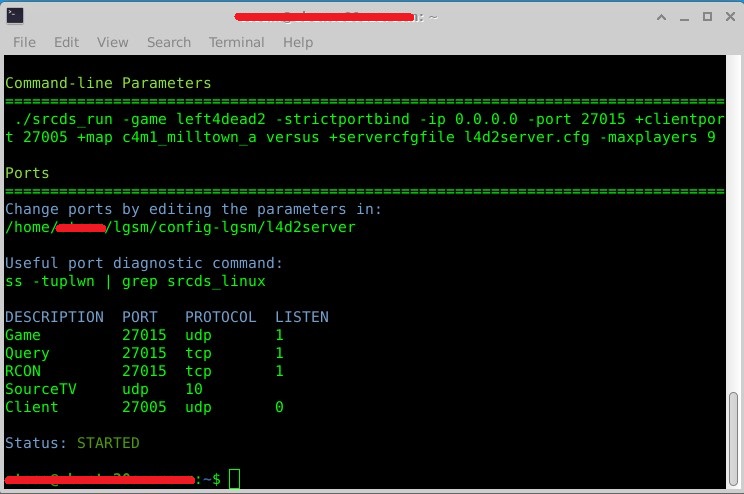
$ ./l4d2server details
Running details should return Status: STARTED as seen in the image below
Usefull locations:
- /home/user/serverfiles/left4dead2/cfg/l4d2server.cfg -> actual server configuration
- /home/user/log/script/ -> linuxgsm logs
- /home/user/log/console/ -> l4d2 logs
- /home/user/serverfiles/left4dead2/addons/sourcemod/logs/ -> sourcemod logs